
Kia Picanto (JA): Maintenance / Air cleaner (Kappa 1.0L T-GDI)
Filter replacement
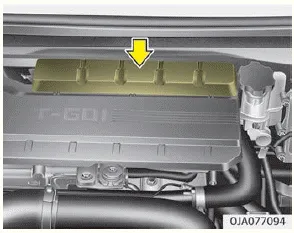
It must be replaced when necessary, and should not be washed. You can clean the filter when inspecting the air cleaner element. Clean the filter by using compressed air.

1. Loosen the air cleaner cover attaching clips and open the cover.
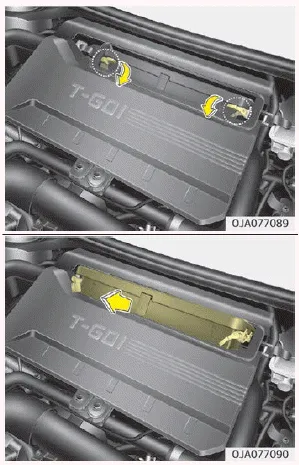
2. Unlock by turning the locking lever downward.
3. Pull the air cleaner filter to replace.
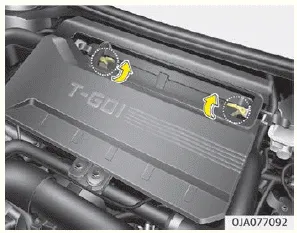
4. Pull up the lever to the LOCK position.
5. Check if the cover is firmly installed.
Replace the filter according to the “Maintenance Schedule” on page 8-11. If the vehicle is operated in extremely dusty or sandy areas, replace the element more often than the usual recommended intervals. (Refer to “Maintenance under severe usage conditions” on page 8-17.)
CAUTION
- Do not drive with the air cleaner removed; this will result in excessive engine wear.
- When removing the air cleaner filter, be careful that dust or dirt does not enter the air intake, or damage may result.
- Use parts for replacement from a professional workshop. Kia recommends to visit an authorized Kia dealer/service partner.
Filter replacement It must be replaced when necessary, and should not be washed. You can clean the filter when inspecting the air cleaner element.
Filter inspection The climate control air filter should be replaced according to the maintenance schedule. If the vehicle is operated in severely air-polluted cities or on dusty rough roads for a long period, it should be inspected more frequently and replaced earlier.
Other information:
Kia Picanto (JA) 2017-2026 Service & Repair Manual: Seat Heater Switch
Components and components location Components 1. Driver side seat heater switch 2. Passenger side seat heater switch Schematic diagrams Circuit Diagram Repair procedures Removal 1. Disconnect the negative (-) battery terminal.
Kia Picanto (JA) 2017-2026 Service & Repair Manual: Climate Control Air Filtar
Description and operation Description This has particle filter which eliminates foreign materials and odor. The particle filter includes odor filter as well as conventional dust filter to ensure comfortable interior environment. Repair procedures Replacement 1.
Categories
- Manuals Home
- Kia Picanto Owners Manual
- Kia Picanto Service Manual
- Heating,Ventilation, Air Conditioning
- Battery
- Features of your vehicle
- New on site
- Most important about car
