
Kia Picanto (JA): What to do in an emergency / Tire Pressure Monitoring System (TPMS)
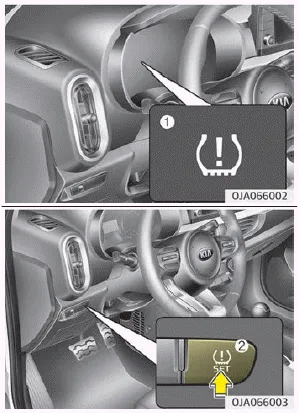
Low tire pressure telltale (1) / TPMS SET switch (2)
System Overview
The tire pressure monitoring system (TPMS) senses change in radius of the tire. If the tire pressure decreases below the recommended pressure, the system warning light will be illuminated.
For the system to function properly, it is the driver’s responsibility to set the system by following accurate procedure and set current tire pressure.
The warning light will illuminate on the cluster when one or more of your tires is under-inflated after the TPMS is set. The warning light will also illuminate to warn the driver of system malfunction. Please refer to the above image (1) for further information.
If your temperature gauge indicates overheating, you will experience a loss of power, or hear loud pinging or knocking, the engine is probably too hot.
The driver can set the TPMS by following procedures below: 1. Inflate all tires to the recommended pressure. 2. Start the engine, make sure the vehicle is not moving, and press the TPMS switch (2) left side on the driver’s seat for over 3 seconds.
Other information:
Kia Picanto (JA) 2017-2026 Service & Repair Manual: Multifunction Switch
Specifications Specifications Items Specifications Rated voltage DC 12 V Operating temperature range -22 - 176°F (-30 - 80°C) Rated load Washer Washer : 6A (Motor load) Components and components location Component 1 .
Kia Picanto (JA) 2017-2026 Service & Repair Manual: Power Door Lock Module
Components and components location Components 1. Door lock/unlock knob cable 2. Door inside handle cable 3. Door latch assembly Repair procedures Inspection • When removing with a flat-tip screwdriver or remover, wrap protective tape around the tools to prevent damage to
Categories
- Manuals Home
- Kia Picanto Owners Manual
- Kia Picanto Service Manual
- Heating,Ventilation, Air Conditioning
- Engine Mechanical System
- Engine And Transaxle Assembly
- New on site
- Most important about car
