
Kia Picanto (JA): Body (Interior and Exterior) / Fender
Components and components location
| Component Location |
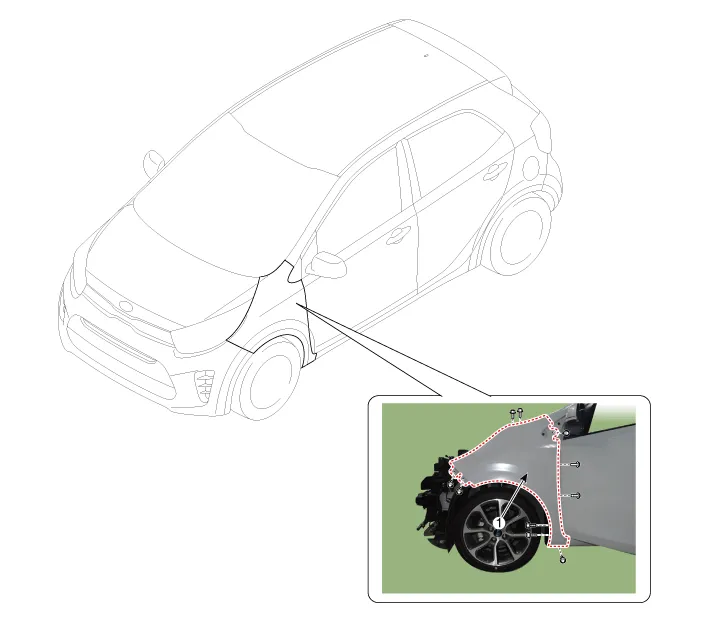
| 1. Fender assembly |
Repair procedures
| Replacement |
|

| 1. | Remove the headlamps.
(Refer to Front Bumper - "Front Bumper Assembly")
|
| 2. | Remove the front wheel guard.
(Refer to Body Side Molding - "Front Wheel Guard")
|
| 3. | Remove the front bumper side bracket (A) after loosening the screws.
|

| 4. | After loosening the mounting screws, bolts, and nut, remove the fender assembly (A).
|

| 5. | Install in the reverse order of removal.
|
Components and components location Component Location 1. Crash pad center lower panel Repair procedures Replacement Put on gloves to protect your hands.
Components and components location Component Location 1. Floor carpet assembly Repair procedures Replacement Put on gloves to protect your hands.
Other information:
Kia Picanto (JA) 2017-2026 Service & Repair Manual: Junction Box (Passenger Compartment)
Components and components location Component Location I/P Junction Box Circuit (I/P Junction Box) Description and operation Description Communication Network Diagram Abbreviation Explanation ABS Anti-lock Brake System ACU Airbag Control Un
Kia Picanto (JA) 2017-2026 Service & Repair Manual: Horn
Components and components location Component Location 1. Horn switch 2. Horn relay 3. Horn 4. Clock spring Repair procedures Removal 1.Disconnect the negative (-) battery terminal. 2.Remove the engine room under cover. G 1.
Categories
- Manuals Home
- Kia Picanto Owners Manual
- Kia Picanto Service Manual
- Timing Chain
- Features of your vehicle
- Clutch Cable
- New on site
- Most important about car
